Prevent Duplicate Records in Dynamics 365
In any CRM system, data is the backbone of business operations. However, when duplicate records exist, it creates serious problems such as incorrect reporting, poor customer experience, and confusion among users.
Microsoft Dynamics 365 provides a powerful feature called Duplicate Detection which helps identify and prevent duplicate records automatically during data entry, updates, and imports.
In this blog, we will explore how to configure duplicate detection step-by-step and understand why it is essential for maintaining high-quality CRM data.
❓ Why Duplicate Records Are a Problem?
Duplicate records may seem like a small issue, but in real-world business scenarios, they can lead to serious consequences.
- Sales team may contact the same customer multiple times
- Reports become inaccurate due to duplicate entries
- Marketing campaigns send repeated emails
- Customer trust gets affected
For example, if a customer named "ABC Corp" is stored twice in the system, sales revenue and interactions may be split across two records, leading to confusion.
🔹 Step 1: Open Advanced Settings
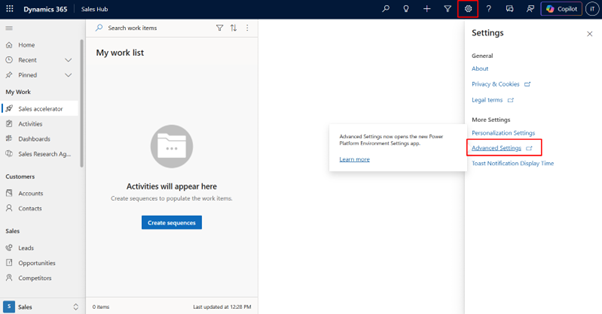
First, navigate to the Settings area in Dynamics 365 and click on Advanced Settings.
This will redirect you to the Power Platform environment settings page, where all system-level configurations are available.
🔹 Step 2: Navigate to Data Management
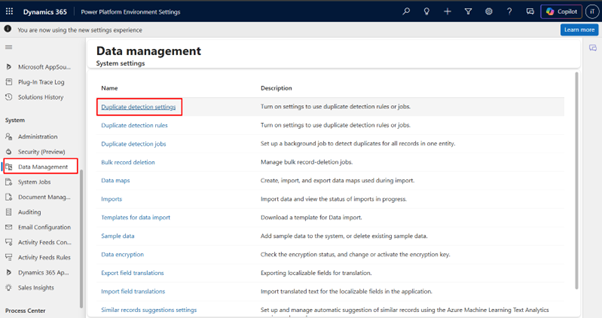
Inside Advanced Settings, go to Data Management.
Here you will find multiple options related to data handling, including duplicate detection rules and settings.
🔹 Step 3: Enable Duplicate Detection
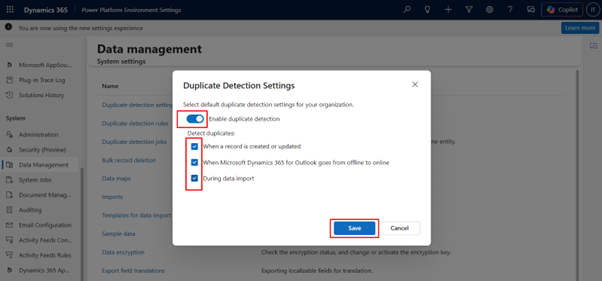
Enable duplicate detection by turning on the toggle.
- During Create
- During Update
- During Import
This ensures duplicates are detected in all scenarios.
🔹 Step 4: Create Duplicate Detection Rule
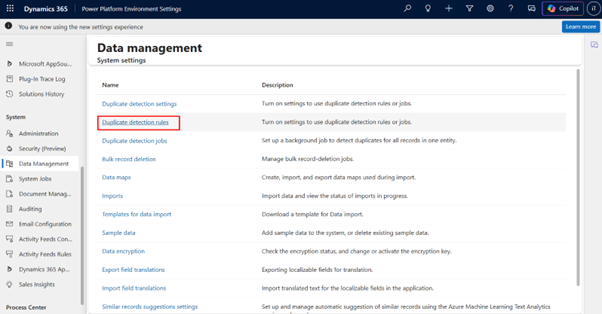
Create a rule to define what counts as a duplicate.
Example:
- Entity: Account
- Field: Account Name
- Criteria: Exact Match
You can also create advanced rules using email, phone number, etc.
🔹 Step 5: Publish the Rule
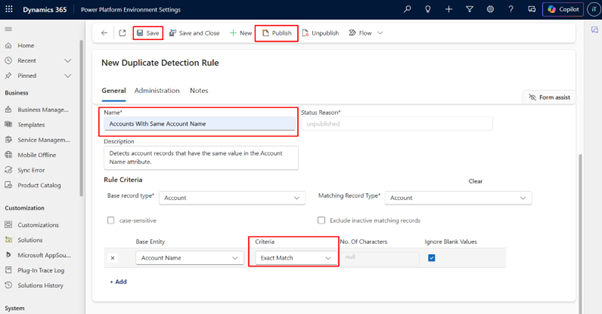
After creating the rule, click Publish.
Only published rules will be active in the system.
Once enabled, the system will automatically detect duplicates and prevent users from creating them.
🧪 Testing Duplicate Detection (Final Output)
After configuring duplicate detection rules, let's test the system behavior. Below are real-time scenarios demonstrating how Dynamics 365 prevents duplicate records.
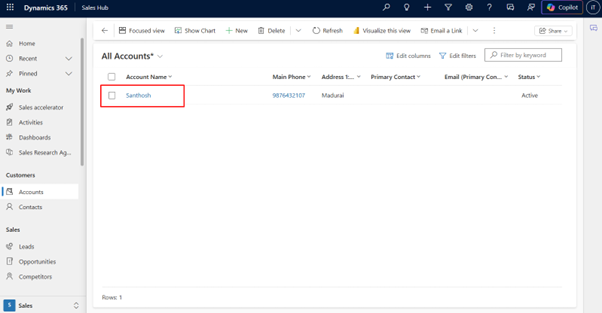
📌 Existing Record in CRM
Here, we already have an account named Santhosh in the system. This acts as our existing data.
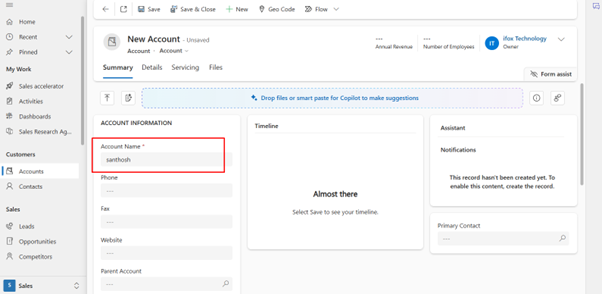
📌 Creating New Record with Same Name
When we try to create a new account with the same name, Dynamics 365 starts validating based on duplicate detection rules.
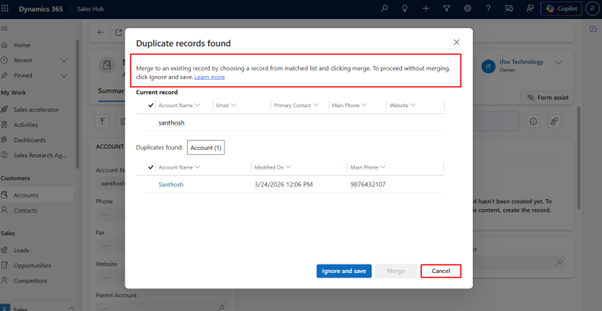
🚫 Duplicate Detected
The system immediately shows a duplicate warning popup.
- Shows existing matching record
- Gives option to merge or ignore
- Prevents accidental duplicate creation
This ensures data consistency and avoids duplication issues.
✅ Final Result
After implementing duplicate detection:
- No duplicate accounts or contacts
- Improved CRM data quality
- Accurate reporting
- Better customer experience
AI-powered and rule-based data validation features like Duplicate Detection play a critical role in maintaining high-quality CRM data. Instead of relying on manual checks, businesses can automate data validation and ensure consistency across the system.
With Dynamics 365, organizations can prevent duplicate records in real-time, improve reporting accuracy, and enhance overall customer experience. As CRM systems continue to evolve, implementing features like duplicate detection is no longer optional — it is essential for scalable and reliable business operations.